Infill

iPhone and iPad app

3D Print Cost Calculator for iPhone and iPad

Infill turns the two numbers your slicer already gives you, grams and print time, into what a print costs you and what to charge for it.

  • Free on the App Store
  • iOS 17.0 or later
  • iPhone and iPad
  • No account
  • No ads, no tracking
  • English and German
42 g PLA, 3 h 20 m, Bambu Lab P1S 10 min hands-on, 0.30 per kWh, 20.00 per hour
What the print costs you
Labor3.34
Material0.94
Machine0.49
Failed prints0.20
Electricity0.13
Total cost5.10
Charge at 50 percent margin 10.20

Worked example using Infill's own default profiles, at a 4 percent failure rate and a direct sale with no marketplace fees. Every figure is editable, and the listed lines always add up to the figure at the top.

On screen

The app, not a description of it

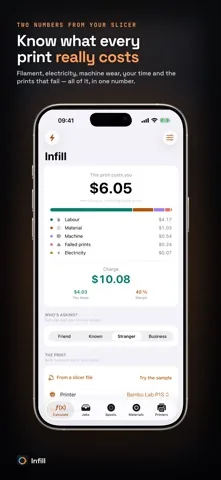
Infill's calculate screen showing what a print costs, split into labor, material, machine, failed prints and electricity, with the suggested charge underneath.
The whole cost, itemized, with the charge below it.
The Who is asking row with Friend selected, and a quote priced at cost with a zero percent margin.
One tap for Friend, Known, Stranger or Business.
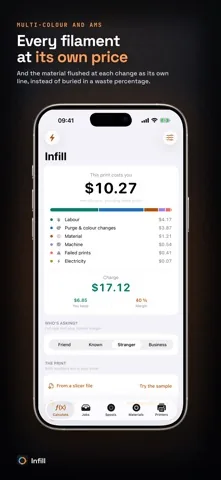
A multi-color print's breakdown with a separate line for purge and color changes above material.
Purge and color changes as their own line.
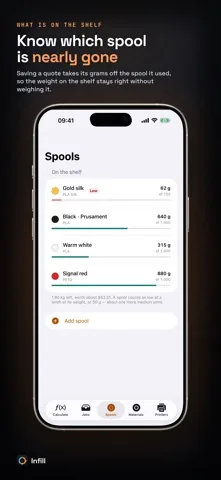
The Spools screen listing four spools with the grams left on each, one of them flagged as low.
What is on the shelf, drawn down by saved quotes.

What it does

Five things a slicer will not tell you

The whole cost, itemized

Filament, electricity, machine depreciation, wear, your hands-on time, post-processing, the material flushed at every color change, packaging and shipping, and the prints that fail. The listed lines always add up to the figure at the top.

Who is asking?

One tap switches between Friend, Known, Stranger and Business. A friend pays cost. A shop pays a commercial premium. Your hourly rate and your margin move together, the way you already price in your head.

Multi-color and AMS, priced properly

Every filament in the print is charged at its own rate, and the material flushed at each change gets its own line instead of being buried in a waste percentage. On a four-color print it is routinely the second largest cost.

Read it out of the slicer file

Open a .gcode from PrusaSlicer, Bambu Studio, OrcaSlicer or Cura, or a sliced .3mf project from Bambu Studio or OrcaSlicer. Grams and print time fill themselves in. A sample file is included, so you can try the import without a slicer to hand.

What is on the shelf

Keep the spools you actually own: color, weight, what you paid. Saving a quote takes its grams off the spool it used, waste and flushed material included, so the weight on the shelf stays right without weighing it. Spools running low are flagged.

All of it is worked out on the device. No account, no cloud, no backend, no advertising SDKs, no analytics, which is also why it keeps working with no signal in the workshop.

Price your next print in two numbers

Set up your printer, your filament prices, your electricity tariff and your hourly rate once. After that a quote takes two numbers straight off the slicer.

Free on the App Store. iOS 17.0 or later, iPhone and iPad. No account, no advertising, no tracking.

Maths that is actually right

Three sums that quietly cost you money

Margin is not markup

A 50 percent margin means the price is twice your cost. A 50 percent markup means 1.5 times. On a cost of 12.00 that is the difference between charging 24.00 and charging 18.00. Infill keeps them separate and labels them properly.

Failed prints are reruns

At a 20 percent failure rate you pay for 1.25 prints on average, not 1.2, because you rerun the job until one good part comes off the bed. Infill divides by one minus the failure rate instead of adding a flat surcharge.

Marketplace fees come off the price

Etsy takes its cut of the selling price, which is the number you are still trying to work out. Applying the percentage to your cost leaves you short. Infill solves for the price and tells you the item price to put on the listing.

Who uses it

Four situations it was built for

Quoting a print for someone who asked in a chat

Two numbers off the slicer, pick Friend or Stranger, and share the full breakdown as text straight back into the conversation that asked for it.

Selling on a marketplace

Set the channel and Infill works back from the profit you want to the item price to list, with the platform's cut and any fixed listing fee already taken out. Marketplace fees are part of Pro.

Running several machines

Each printer carries its own average wattage, purchase price, expected lifetime hours, maintenance and failure rate, so a job priced on the resin printer is not priced like a job on the big enclosed one.

Selling as a small business

One switch removes VAT and adds the required note to the quote. With VAT on, tax lands on top of item price plus shipping, and the customer total is the anchor everything else is rounded to.

Guides

Read up before you quote

Seven guides on the arithmetic behind a print price, each with the numbers worked out.

FAQ

Questions people ask before installing

Is Infill free?

Yes. The calculator is free in full: the cost breakdown, the selling price, the customer presets, sharing, the slicer import, the spool inventory and the multi-filament model. Infill shows no advertising at all. Infill Pro is a single purchase and never a subscription. It lifts the profile and history limits and adds marketplace fees, VAT on the quote and CSV export.

What does the free version limit?

Two printer profiles, six material profiles and ten saved quotes. Nothing in the arithmetic is held back, and no feature is time limited.

Which slicer files can Infill read?

A .gcode file from PrusaSlicer, Bambu Studio, OrcaSlicer or Cura, and a sliced .3mf project from Bambu Studio or OrcaSlicer. Grams and print time fill themselves in. A sample file ships with the app, so you can try the import without a slicer to hand.

What is the difference between margin and markup?

A 50 percent margin means the price is twice your cost. A 50 percent markup means 1.5 times your cost. Infill keeps the two apart and labels which one you picked, because calculators that multiply by one plus the margin and call it margin quote a third under.

Does Infill handle multi-color and AMS prints?

Yes. Every filament in the print is charged at its own rate, and the material flushed at each color change gets its own line instead of being buried in a waste percentage.

Does Infill need an account or an internet connection?

No. There is no account, no cloud and no backend. There are no advertising SDKs, no analytics and no tracking of any kind. Your prints, prices and customers never leave your device.

Which printers are included?

Printer profiles with average wattages for Bambu Lab, Prusa, Creality, Elegoo and Anycubic machines, plus a generic profile. Every figure is editable, and you can add your own.

Does Infill work on iPad?

Yes. Infill runs on iPhone and iPad, in English and German, on iOS 17.0 or later.

Stop guessing at print prices

Infill is free on the App Store, shows no advertising, and works with no signal in the workshop.

Free on the App Store. iOS 17.0 or later, iPhone and iPad. No account, no advertising, no tracking.