 Infill
Guide
AMS Purge Waste: What a Multi-Color Print Really Costs
The pile of little filament stubs next to the printer is money. On a print with many color changes it can outweigh the part, and most calculators bury it in a waste percentage.

Why a waste percentage hides it
Purge does not scale with the size of the part. It scales with the number of filament changes. A small four-color keychain with a hundred changes throws away more than a large single-color vase, so a flat percentage of material is wrong in both directions: far too high on plain prints, far too low on multi-color ones.
Infill charges it as its own line, from two numbers you can actually check: how many tool changes the print has, and how many grams your printer flushes per change. The app starts at 25 g per change when you turn colors on. Lower it if you have tuned your flushing volumes, raise it if you have not.
Every filament at its own price
A blended rate is the other half of the problem. Silk costs about a quarter more than plain PLA and carbon fiber about twice, so a print that is mostly cheap PLA with a silk accent is not priced by any single number. Infill charges each filament in the print at its own rate.
Which filament is actually flushed at a given change is not something any slicer records, so the purge is charged at the average price of the filaments in the print, weighted by how much of each the part contains. The app says so on screen rather than implying a precision the file does not carry.
The same weighting decides what comes off which spool. A quote that charges you for one filament and takes grams off another would be worse than no inventory at all.
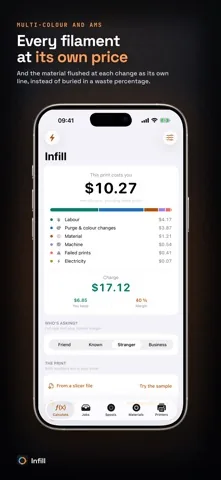
Price the pile next to the printer
Per-filament pricing, purge as its own line and a spool inventory that agrees with the shelf.
Free on the App Store. iOS 17.0 or later, iPhone and iPad. No account, no advertising, no tracking.
A three-color print, worked out
40 g of PLA, 15 g of PLA Silk and 5 g of PLA Carbon Fiber, 5 hours on a Bambu Lab P1S, 12 tool changes at the default 25 g per change, 15 minutes of your hands at 20.00 per hour, electricity at 0.30 per kWh. Infill's default profiles throughout.
| Line | How it is worked out | Amount |
|---|---|---|
| Purge and color changes | 300 g flushed at the weighted average of 0.0252 per g | 7.55 |
| Labor | 15 min at 20.00 per hour | 5.00 |
| Material | 60 g across three filaments, each at its own price, plus waste | 1.54 |
| Machine | 5 h at 0.147 per hour | 0.73 |
| Failed prints | 4 percent failure rate on the P1S profile | 0.63 |
| Electricity | 130 W for 5 h at 0.30 per kWh | 0.20 |
| Total cost | 15.65 |
The flushed material is nearly five times the plastic in the part, and on this print it is the largest line of all. Quote that job on filament alone and you would have said 1.54 and lost 14.11 of your own money on it.
Reduce the flushing volumes in your slicer and this line falls with them. That is the real point of pricing it separately: once it has a number next to it, it becomes something you can decide about.
The spool still has to agree
Saving a quote takes its grams off the spools it used, with waste and the flushed material included and split across the filaments by the same weighting used to price it. The shelf is what catches a bad purge estimate: if your spools run out faster than the app says, your grams per change are too low.
Guides
Related guides
- How much to charge for 3D prints
The seven cost lines, the four-step method, and the three sums most calculators get wrong.
- Filament cost calculator: price per gram
Spool price to price per gram, waste allowance, and what a 42 g print actually costs in plastic.
- 3D printer electricity cost per hour
Average watts for twelve popular printers, and why power is almost never your biggest line.
- G-code cost calculator
What PrusaSlicer, Bambu Studio, OrcaSlicer and Cura write into a file, and what Infill reads back out.
Quote multi-color prints without losing money
Free on the App Store, on iPhone and iPad.
Free on the App Store. iOS 17.0 or later, iPhone and iPad. No account, no advertising, no tracking.