 Infill
Guide
G-code Cost Calculator: Price a Print Straight From the File
Retyping grams and hours off a slicer screenshot is how quotes get wrong. Hand Infill the file instead and it reads the numbers out.

Every slicer writes it down differently
A sliced file already contains what a price needs. The catch is that no two slicers agree on where to put it or what to call it, which is why a parser written against one of them silently finds nothing in the others.
| Slicer | Weight | Print time | Where in the file |
|---|---|---|---|
| PrusaSlicer | Total filament used in grams | Estimated printing time | At the end |
| OrcaSlicer | Total filament used in grams | Estimated printing time | At the end |
| Bambu Studio | Total filament weight in grams, one figure per filament | Total estimated time | At the start |
| Cura | No mass at all, only filament used in metres | A time stamp, or a running figure per layer | At the start, with the running figure at the end |
Infill reads the head and the tail of the file rather than the whole thing. A sliced file runs to hundreds of megabytes and everything worth knowing sits in the first or last few hundred kilobytes, so the import stays quick even on a phone.
The Cura caveat, stated plainly
Cura usually reports the length of filament it pulled through and never the mass, and it does not say which material it was. Grams then have to be derived: cross-section from the filament diameter, times the length, times the density of the material you selected.
That is a calculation, not a measurement, so Infill says so. On a Cura import the app shows the metres it actually read and states that the grams were computed from the material's density. If you picked the wrong material profile, the number is wrong, and you can see why.
Some Cura versions do state the mass alongside the length. When they do, Infill reads it and skips the derivation, because reading is both more accurate and more honest than deriving.
Sliced .3mf projects
Bambu Studio and OrcaSlicer also write their slicing results into a .3mf project, per build plate and per filament, with the weight and the predicted time. Infill reads those directly. They are figures the slicer computed, so no density and no filament diameter enter into it, and a multi-material print that a single chosen density could never describe simply works.
Two honest limits come with the format. A project with several sliced plates does not say which plate you meant, so Infill asks rather than quoting a print nobody ordered. And a .3mf saved before it was ever sliced carries no result at all, which is not an error and is not zero grams. The file just does not say, and the app tells you that instead of inventing a figure.
PrusaSlicer and Cura do not put slicing results in a .3mf, so for those two use the .gcode.
Try it without a slicer
A sample .gcode ships inside the app and goes through exactly the same parser a real file does. Tap it once and you can see the whole flow, from file to grams to cost to selling price, before you decide whether the app is worth space on your phone.
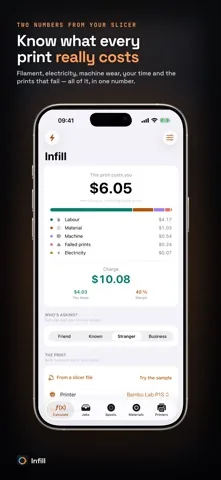
Hand the file over and stop retyping
Import .gcode from four slicers and sliced .3mf projects from two, then get a full cost breakdown and a selling price.
Free on the App Store. iOS 17.0 or later, iPhone and iPad. No account, no advertising, no tracking.
Guides
Related guides
- How much to charge for 3D prints
The seven cost lines, the four-step method, and the three sums most calculators get wrong.
- Filament cost calculator: price per gram
Spool price to price per gram, waste allowance, and what a 42 g print actually costs in plastic.
- 3D printer electricity cost per hour
Average watts for twelve popular printers, and why power is almost never your biggest line.
- AMS purge waste cost
Multi-color prints throw filament away at every change. Here is how to put a number on it.
Read the numbers instead of typing them
Free on the App Store, and the sample file is already in the app.
Free on the App Store. iOS 17.0 or later, iPhone and iPad. No account, no advertising, no tracking.