 Infill
Comparison
An iPhone Alternative to the Prusa Price Calculator
The Prusa calculator is a good free browser tool and a fair starting point. If you quote prints often, three things it does not cover are usually where your money goes.

What the Prusa calculator does
Prusa's own page describes a browser calculator that you can load a G-code file into, or type the print time and filament weight into by hand. It comes prefilled with common values that you can edit, has a currency selector, and covers material, electricity, print preparation and post-processing labor, machine and upkeep cost, and VAT. You can copy the result or print a summary.
That is a solid list, and for an occasional quote it is enough. Below is what changes when pricing is something you do several times a week, on a phone, in a workshop.
Description taken from Prusa's own calculator page at the time of writing. Infill is not affiliated with Prusa Research, and Prusa printers are among the printer profiles it ships with.
Side by side
| Capability | Prusa price calculator | Infill |
|---|---|---|
| Load a sliced file | Yes, a G-code file | Yes: .gcode from four slicers, and sliced .3mf from Bambu Studio and OrcaSlicer |
| Material, electricity, labor, machine, VAT | Yes | Yes |
| Failed prints | Not described | Expected reruns per printer, not a flat surcharge |
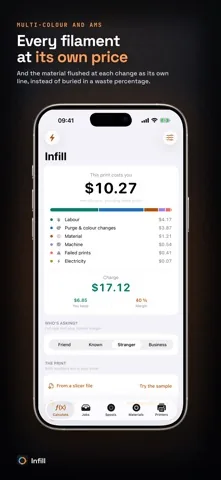
| Purge at color changes | Not described | Its own line, from tool changes and grams per change |
| Several filaments in one print | Not described | Each filament charged at its own price |
| Marketplace fees | Not described | Etsy, eBay, Shopify and Amazon Handmade, solved for the listing price |
| Margin and markup kept apart | Not described | Two labelled modes, converted when a preset compares them |
| Pricing per customer | Not described | Friend, Known, Stranger and Business in one tap |
| Spool inventory | Not described | Saved quotes draw grams off the spool they used |
| Saved quote history | Copy or print a summary | Every quote stored, shareable as text, exportable as CSV with Pro |
| Where it runs | In a browser | On iPhone and iPad, on the device, with no account and no signal needed |
Why those three lines matter
Failures, purge and marketplace fees have one thing in common: each is invisible on the slicer screen and each is large enough to erase a hobby margin on its own.
- Failures. At a 20 percent failure rate you pay for 1.25 prints, not 1.2. Getting that backwards costs half a euro on every ten euro job.
- Purge. On a three-color print with twelve changes at the default 25 g, the flushed material can be several times the plastic in the part.
- Marketplace fees. Adding the percentage to your cost instead of solving for the price left the worked Etsy example on this site 0.61 short on a 11.96 item.
None of that makes a browser calculator wrong. It makes it a different tool. A web page is the right shape for a one-off estimate; an app on the phone in your pocket is the right shape for the fifteenth quote this month, with your printers, your prices and your customers already in it.
Take the calculator to the printer
Infill is free on the App Store, runs on the device, and keeps your printers and prices ready for the next quote.
Free on the App Store. iOS 17.0 or later, iPhone and iPad. No account, no advertising, no tracking.
Guides
Related guides
- How much to charge for 3D prints
The seven cost lines, the four-step method, and the three sums most calculators get wrong.
- Filament cost calculator: price per gram
Spool price to price per gram, waste allowance, and what a 42 g print actually costs in plastic.
- 3D printer electricity cost per hour
Average watts for twelve popular printers, and why power is almost never your biggest line.
- G-code cost calculator
What PrusaSlicer, Bambu Studio, OrcaSlicer and Cura write into a file, and what Infill reads back out.
One tool, from the file to the listing price
No account, no advertising, no tracking. iOS 17.0 or later.
Free on the App Store. iOS 17.0 or later, iPhone and iPad. No account, no advertising, no tracking.